




Key takeaways
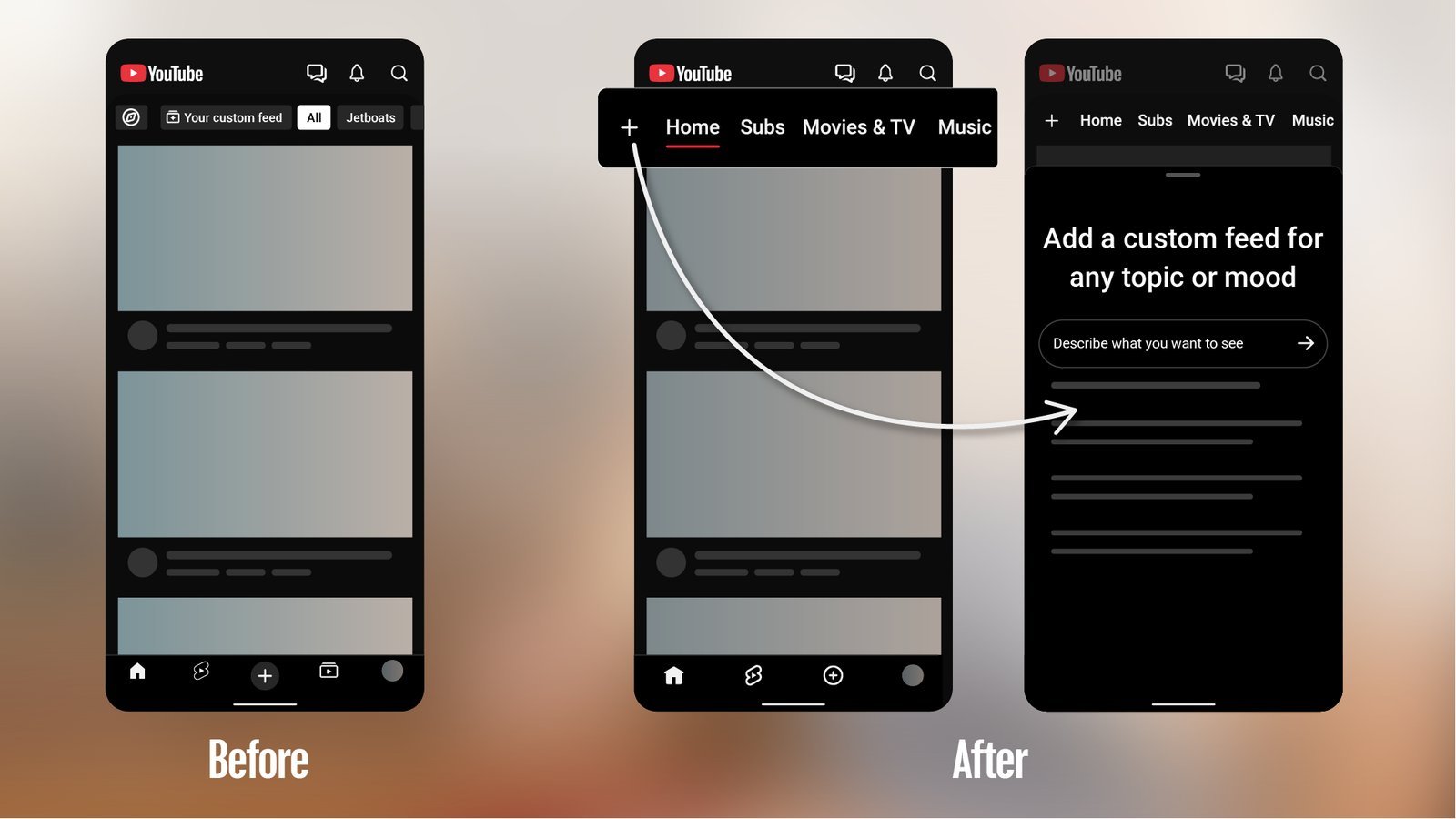
- YouTube’s new mobile app layout removes the Subscriptions button from the bottom bar. The feed is now called “Subs” and sits in a row at the top of the Home tab, right after “Home.”
- The bottom bar is down to four buttons: Home, Shorts, Create and You. The top row also adds Live, Music and, for some paying users, Movies & TV.
- Your subscriptions are all still there. Tap Home, then Subs. Tap “All” to see the full list of channels you follow.
- On Android, long-pressing the YouTube icon gives you a Subscriptions shortcut that opens the older page, filters included.
- If your YouTube watch history is paused or off, the new top bar doesn’t show up at all.
Opened YouTube on your phone lately and couldn’t find your subscriptions? You’re not imagining it. The button your thumb has been hitting for years is gone, and the bottom of the screen now has a big “+” where Subscriptions used to be.
Nothing was deleted. YouTube moved it. Here’s what changed, where everything went, and a few real ways to get back to the channels you actually follow.
What YouTube changed
YouTube announced the redesign on Oct. 22 in a TeamYouTube post on its Help Community. The company called it the start of “a series of updates to shape a more seamless Home experience.” The key line for most people: “Subs (formerly Subscriptions): Your Subs feed is moving to the top bar on the Home tab.”
According to 9to5Google, Subscriptions had been the fourth button in the bottom bar since 2017. It’s now the second item in a row of tabs at the top of Home, underlined in red when selected. The redesign also drops YouTube’s old navigation drawer.
The wider rollout started in early November. 9to5Google reported on Nov. 5 that it was showing up on Android and on many iPhones. It seems to arrive through a server-side switch, not an app update, so you might get it whether or not you update the app.
Where everything went
- Bottom bar: Home, Shorts, Create and You.
- Top row of the Home tab: Home (your recommendations), Subs, Live and Music. YouTube’s feeds help page says you can scroll through this row to see them all.
- Movies & TV: only shows in the top row if you have active Primetime Channel subscriptions or YouTube TV add-ons. Otherwise you’ll find it in the More menu, along with Gaming, Podcasts, Playables and Memberships.
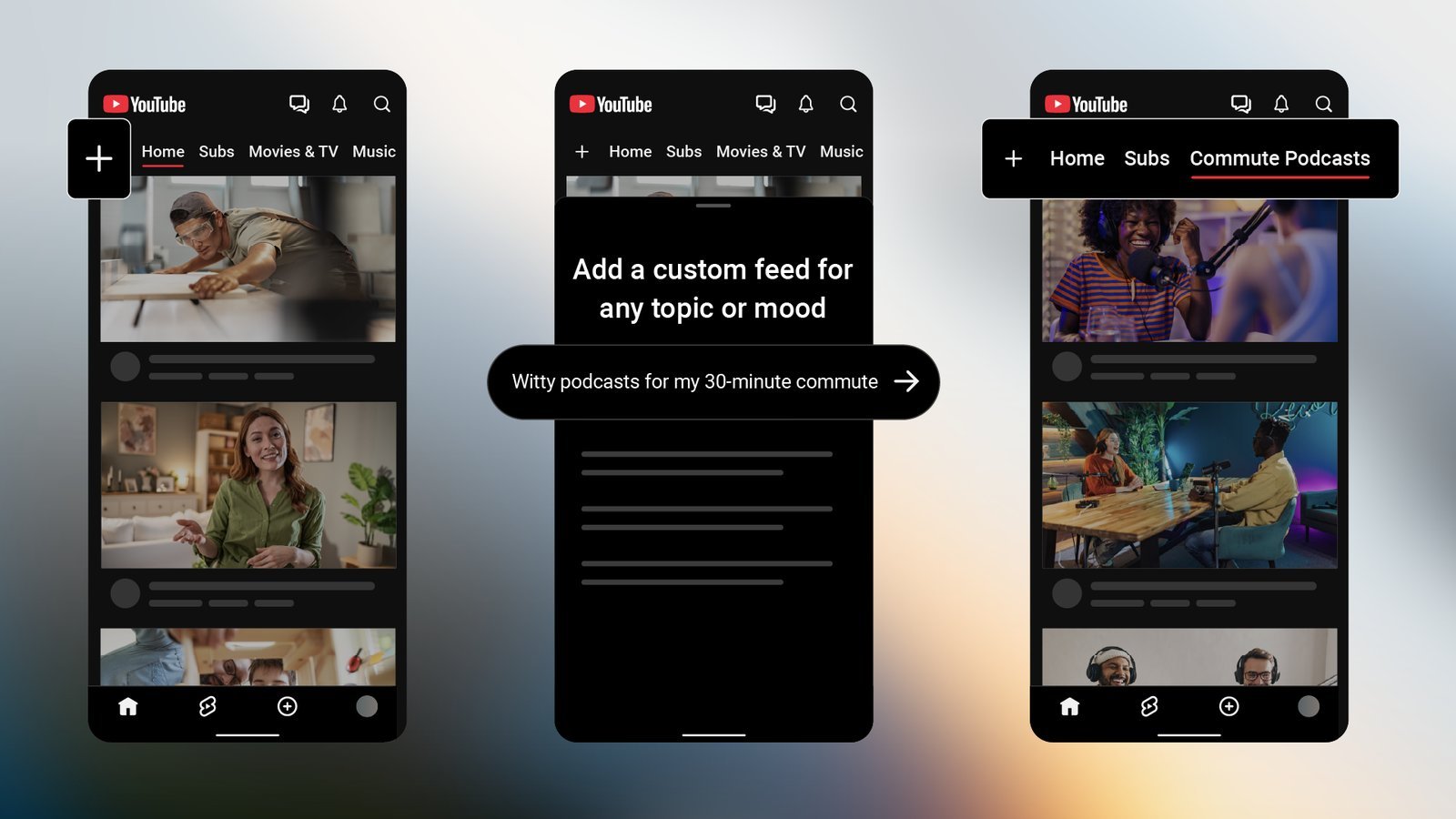
- Custom feeds: the “+” at the top of Home lets you describe what you want to watch, and YouTube builds a feed from that prompt. Free accounts can save up to 3 custom feeds and Premium members up to 8. For now they’re limited to signed-in US viewers using English.
Why people are annoyed
The backlash has been loud. 9to5Google rounded up reactions calling the new layout “sloppy” and “disgusting.” In an Android Authority reader poll with 1,370 votes, 93% picked “I hate it. Bring back the old Subscriptions tab.”
It’s not only about the extra tap. Android Authority’s Khamosh Pathak points out that the new Subs screen drops the filter row at the top of the old Subscriptions page, including the “Today” filter he used to see only fresh uploads. Some replies under YouTube’s own announcement ask for an option to put Subscriptions back in the bottom bar, and one person says they canceled YouTube Premium over it.
So far, YouTube hasn’t announced a setting to bring the old layout back. That means the options below are workarounds, not a fix.
How to find your subscriptions now
This is the official route, from YouTube’s subscriptions help page:
- Open the YouTube app and make sure you’re signed in.
- Tap Home in the bottom bar.
- In the row at the top of the screen, tap Subs, the second item after Home.
- To see every channel you follow, tap All. You can filter the list with the drop-down arrow at the top.
Channels with new videos show a dot next to their name, and channels streaming right now show “Live.” You can also swipe left or right on the Home tab to move between feeds, though Android Authority found that easy to trigger by accident.
Workarounds that actually help
1. Use the Subscriptions shortcut on Android
This is the closest thing to the old experience. Android Authority found that YouTube’s app shortcut still opens the older Subscriptions page, filters and all:
- On your Android home screen, press and hold the YouTube app icon.
- In the menu that pops up, tap Subscriptions.
- To make it permanent, tap the + next to Subscriptions. That adds a shortcut to your home screen that opens straight into your feed.
Android Authority hopes this “isn’t just a glitch,” so it could change down the road. We couldn’t confirm the same shortcut on iPhone. iPhone users can still press and hold the icon to see what shows up.
2. Keep your watch history on
This one catches people off guard. YouTube’s feeds help page says the feeds and the top bar don’t appear if your YouTube watch history is paused or turned off. If you turned history off at some point and now can’t find Subs anywhere, that may be why. Custom feeds also need watch and search history on.
3. Use a browser for a plain feed
If you mostly watch on a computer, going to youtube.com/feed/subscriptions in your browser opens your subscriptions feed directly. Bookmark it and you can skip Home entirely.
App changes you didn’t ask for are frustrating, especially when the old version worked fine. We covered another one this week with Microsoft To Do shutting down.
How to tell YouTube what you think
If you want the old layout back, feedback is the official way to say so. From YouTube’s send feedback help page:
- Open the YouTube app.
- Tap your profile picture.
- Tap Settings.
- Tap Send feedback.
- Describe the problem. Be specific, for example: “Please let me put Subscriptions back in the bottom bar and bring back the Today filter.”
- Choose whether to include screenshots and logs, then tap the send button in the top right.
YouTube says feedback goes straight to the company, creators can’t see it, and it may not reply to every report. You can also leave a comment on the TeamYouTube announcement, where YouTube asked people to “let us know what you think.”
The bottom line
Your subscriptions didn’t disappear. They’re one tap deeper, under Home, then Subs. If that extra step bugs you, the Android shortcut is the best fix for now, and keeping your watch history on makes sure the new top bar shows up. YouTube says more Home updates are coming, so this layout may keep changing. If you want the old one back, send feedback.
Sources
- YouTube Help Community (TeamYouTube): New ways to explore YouTube from your Home page
- YouTube Help: How to explore feeds on the YouTube app
- YouTube Help: Subscribe to YouTube channels
- YouTube Help: Send feedback
- 9to5Google: YouTube removing ‘Subscriptions’ bottom bar tab on Android, iOS after nearly a decade
- 9to5Google: YouTube rolling out app redesign without Subscriptions tab, and everyone hates it
- Android Authority: YouTube’s redesign brings one annoying change, but I found a workaround